

GithubStatusChecks, GithubStatusComments, and GithubLintComments) start posting results to your pull requests.
This page covers installing and linking the App. For the account setup and the ASPECT_API_TOKEN your CI uses, see Authenticating the Aspect CLI.
Using GitLab? See the GitLab App for the equivalent.
What the App enables
Once installed and linked, these CLI features can post to GitHub from your CI runs:GithubStatusChecks: per-task pass/fail status checks on the commit, on pull request and push builds, updated live as tasks finish.GithubStatusComments: a single PR task summary comment that aggregates every task’s live status into one comment, updated as jobs complete.GithubLintComments:aspect lintfindings posted as inline PR review comments, with one-click suggestion blocks. Seeaspect lintfor behavior and config.
aspect format and aspect lint. Both tasks prefer a local git diff against the merge base; on PR builds where git diff can’t resolve the diff base (shallow clones or fetch-depth-restricted runners), they fall back to the GitHub PR Files API.
On a pull request
A status check per task, updated as the task progresses rather than only when the job ends. Lint findings on the line that caused them. Whenaspect lint reports a warning or error, it lands as an annotation on the offending line:

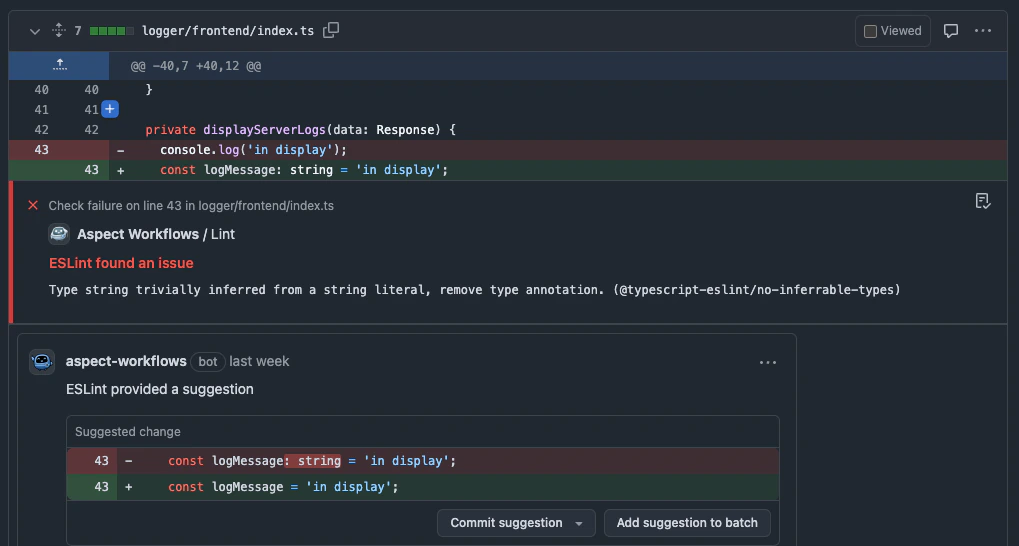
These come from
aspect <task>. The CLI streams structured events as each task runs, and
the App turns them into checks and comments. A vanilla bazel step produces none of them.Install and link the App
1
Have an Aspect account with the right role
Installing the App requires an Aspect account with the Account Owner, Account Admin or GitHub Integration Admin role. If you don’t have an account yet, or need a role assigned, see the account setup notes first.
2
Install the Aspect Workflows GitHub App and link it to your Aspect account
Use the panel below to install the App on your GitHub organization. Installing through this panel auto-links the installation to your Aspect account; linking is what enables the Aspect CLI to use the App. Already installed the App separately? Use Link an existing installation in the same panel to associate it with your Aspect account.You must also be an admin of the GitHub organization where the App is being installed; GitHub gates app installation on that role.
3
Generate an Aspect API token for CI
With the App linked, generate an
ASPECT_API_TOKEN and wire it into CI. Pick GitHub CI roles (covers GithubStatusChecks, GithubStatusComments, and GithubLintComments).See Generate an Aspect API token for the full walkthrough and the GitHub token roles and scopes table.Post to a pull request from outside GitHub CI
When no CI variable names the pull request, such as a GitLab pipeline for a repository mirrored from GitHub, or a local run, setASPECT_GITHUB_PR_NUMBER. The repository comes from ASPECT_VCS_URL, GITHUB_REPOSITORY or the origin remote, and the commit from GITHUB_SHA or the CI host’s commit variable. To test against a real PR from your machine:
ASPECT_GITLAB_MR_IID on the GitLab App page.
Troubleshooting
A feature that can’t authenticate logs one line naming what’s missing (no credential, or the App not installed or linked), prefixed with the feature, for exampleGitHub status checks: Authentication failed for <owner>/<repo> — <reason> or GitHub lint comments: Authentication failed for ….
If PR comments or status checks aren’t appearing as expected, check the GitHub App installation (panel above) and your ASPECT_API_TOKEN first. A 403 / Authentication failed usually means the token’s roles don’t cover the scope a feature needs; see When a role is missing.
Support
Hit a bug or have a feature request? Open an issue on aspect-build/aspect-cli. Join the Aspect Community Slack, Aspect’s free community support. Ask in#help for general support. Join the discussion and see what others are building with the Aspect CLI and Aspect Extension Language (AXL) in the #cli and #axl channels.
For Bazel and the Bazel rulesets, Bazel Slack is the best place for support and discussion. Ask about Aspect’s rules_js in #javascript and rules_py in #python.