> ## Documentation Index
> Fetch the complete documentation index at: https://site.aspect.build/llms.txt
> Use this file to discover all available pages before exploring further.

# Build & Test UI for Bazel

> Highlight critical information needed to resolve your build failures, so you stay in the flow.

export const MarketingPage = () => <div className="marketing-page-marker" style={{
  display: "none"
}} />;

export const CTA = ({title, subtitle, primaryCta, primaryHref = "#", secondaryCta, secondaryHref = "#"}) => <section className="w-full flex justify-center px-4 py-16 md:py-20">
    <div className="w-full rounded-2xl text-white flex flex-col md:flex-row items-center justify-center gap-10 md:gap-16 p-8 md:p-12 text-center md:text-left" style={{
  maxWidth: "1140px",
  background: "linear-gradient(135deg, #1a3a5c 0%, #176ACC 100%)"
}}>
      <div>
        <h2 className="text-2xl md:text-3xl font-semibold tracking-tight">{title}</h2>
        {subtitle && <div className="mt-3 text-blue-100 text-base">{subtitle}</div>}
      </div>
      <div className="flex flex-wrap gap-3 shrink-0 justify-center">
        {primaryCta && <a href={primaryHref} className="inline-flex items-center px-6 py-3 rounded-lg bg-white text-blue-700 font-semibold hover:bg-blue-50 transition whitespace-nowrap shadow-sm">
            {primaryCta}
          </a>}
        {secondaryCta && <a href={secondaryHref} className={`inline-flex items-center px-6 py-3 rounded-lg border border-blue-300/50 text-white font-semibold hover:bg-blue-700/30 transition whitespace-nowrap ${secondaryHref === "/request-demo" ? "demo-gradient-btn" : ""}`}>
            {secondaryCta}
          </a>}
      </div>
    </div>
  </section>;

export const Testimonial = ({quote, author, role, company, caseStudyHref, children}) => <div className="relative flex flex-col p-8 md:p-12 rounded-2xl bg-zinc-50 dark:bg-zinc-800/40 border border-zinc-200 dark:border-zinc-700 overflow-hidden">
    <svg className="absolute top-8 left-8 w-12 h-12 text-zinc-200 dark:text-zinc-700 opacity-80" fill="currentColor" viewBox="0 0 24 24" aria-hidden="true">
      <path d="M14.017 21v-7.391c0-5.704 3.731-9.57 8.983-10.609l.995 2.151c-2.432.917-3.995 3.638-3.995 5.849h4v10h-9.983zm-14.017 0v-7.391c0-5.704 3.731-9.57 8.983-10.609l.995 2.151c-2.432.917-3.995 3.638-3.995 5.849h4v10h-9.983z" />
    </svg>
    <div className="relative flex flex-col md:flex-row items-start gap-8">
      <div className="flex-1">
        <p className="text-xl md:text-2xl text-zinc-800 dark:text-zinc-100 leading-relaxed font-medium">
          "{quote}"
        </p>
        <div className="mt-8 flex items-center gap-4">
          <div>
            <div className="font-semibold text-zinc-900 dark:text-white text-base" style={{
  display: "block"
}}>{author}</div>
            {role && <div className="author-role-gap text-sm text-zinc-400 dark:text-zinc-500" style={{
  display: "block",
  marginTop: "0.625rem"
}}>{role}{company ? `, ${company}` : ""}</div>}
          </div>
        </div>
      </div>
      <div className="flex flex-col items-center gap-5 md:min-w-44 shrink-0">
        {children && <div className="testimonial-company-logo">{children}</div>}
        {caseStudyHref && <a href={caseStudyHref} className="inline-flex items-center px-4 py-2 rounded-lg bg-blue-600 text-white text-sm font-semibold hover:bg-blue-700 transition shadow-sm whitespace-nowrap">
            Read Case Study
          </a>}
      </div>
    </div>
  </div>;

export const FeatureShowcase = ({title, description, href, linkText = "Learn more", flipped = false, label, children}) => <div className={`flex flex-col ${flipped ? "md:flex-row-reverse" : "md:flex-row"} items-center gap-10 md:gap-16 py-10`}>
    <div className="flex-1 min-w-0">
      {label && <p className="text-xs font-semibold tracking-widest text-blue-600 dark:text-blue-400 uppercase mb-3">{label}</p>}
      <h3 className="text-2xl md:text-3xl font-bold text-zinc-900 dark:text-white tracking-tight">{title}</h3>
      <p className="mt-4 text-zinc-500 dark:text-zinc-300 leading-relaxed text-base">{description}</p>
      {href && <div className="mt-6">
          <a href={href} className="inline-flex items-center text-blue-600 dark:text-blue-400 font-semibold text-sm hover:underline underline-offset-2">
            {linkText} →
          </a>
        </div>}
    </div>
    <div className="flex-1 min-w-0 feature-showcase-image">
      {children}
    </div>
  </div>;

export const FeatureCard = ({title, description, href, children}) => {
  const Tag = href ? "a" : "div";
  const tagProps = href ? {
    href
  } : {};
  return <Tag {...tagProps} className={`group flex flex-col p-6 rounded-xl border border-zinc-200 dark:border-zinc-700/60 bg-white dark:bg-zinc-800/50 ${href ? "hover:shadow-md hover:border-blue-200 dark:hover:border-blue-700 transition-all duration-200" : ""}`}>
      {children && <div className="feature-card-icon mb-5 flex items-center justify-center rounded-xl bg-blue-50 dark:bg-blue-900/20 border border-blue-100 dark:border-blue-800/30" style={{
    width: "4rem",
    height: "4rem"
  }}>
          {children}
        </div>}
      <h3 className={`text-lg font-semibold text-zinc-900 dark:text-white ${href ? "group-hover:text-blue-600 dark:group-hover:text-blue-400 transition-colors" : ""}`}>
        {title}
      </h3>
      {description && <p className="feature-card-desc text-sm text-zinc-500 dark:text-zinc-400 leading-relaxed">{description}</p>}
    </Tag>;
};

export const FeatureGrid3 = ({children}) => <div className="marketing-grid-3">{children}</div>;

export const SectionHeader = ({title, subtitle, centered = true, label}) => <div className={`mb-12 ${centered ? "text-center" : ""}`}>
    {label && <p className="text-xs font-semibold tracking-widest text-blue-600 dark:text-blue-400 uppercase mb-3">
        {label}
      </p>}
    <h2 className="text-4xl md:text-5xl font-semibold text-zinc-900 dark:text-white tracking-tight">{title}</h2>
    {subtitle && <div className={`subtitle-gap text-lg md:text-xl text-zinc-500 dark:text-zinc-300 leading-relaxed ${centered ? "mx-auto" : ""}`} style={{
  marginTop: "1rem",
  maxWidth: centered ? "700px" : "none"
}}>
        {subtitle}
      </div>}
  </div>;

export const Section = ({children, className = "", gray = false, dark = false, id}) => <section id={id} className={`w-full flex justify-center px-4 py-16 md:py-24 ${gray ? "bg-gray-50 dark:bg-zinc-900" : dark ? "bg-zinc-900 dark:bg-zinc-950" : ""} ${className}`}>
    <div className="w-full" style={{
  maxWidth: "1140px"
}}>
      {children}
    </div>
  </section>;

export const Hero = ({title, subtitle, badge, primaryCta, primaryHref = "#", secondaryCta, secondaryHref = "#", centered = true, children}) => <section className="w-full flex justify-center px-4 pt-16 pb-16 md:pt-24 md:pb-24" style={{
  background: "linear-gradient(180deg, var(--hero-gradient-start, #f8fafc) 0%, var(--hero-gradient-end, #ffffff) 100%)"
}}>
    <div className="w-full" style={{
  maxWidth: "1140px"
}}>
      {centered && !children ? <div className="flex flex-col items-center text-center">
          {badge && <div className="inline-flex items-center gap-2 px-4 py-1.5 rounded-full bg-blue-50 dark:bg-blue-900/30 border border-blue-200 dark:border-blue-700 text-blue-700 dark:text-blue-300 text-sm font-medium mb-6">
              {badge}
            </div>}
          <h1 className="text-4xl md:text-5xl font-semibold text-zinc-900 dark:text-white leading-tight tracking-tight" style={{
  maxWidth: "820px"
}}>
            {String(title).split(/\\n|\n/).map((line, i) => i ? [<br key={i} />, line] : line)}
          </h1>
          {subtitle && <div className="subtitle-gap text-lg md:text-xl text-zinc-500 dark:text-zinc-300 leading-relaxed" style={{
  marginTop: "1rem",
  maxWidth: "600px"
}}>
              {subtitle}
            </div>}
          <div className="flex flex-wrap gap-3 mt-10 justify-center">
            {primaryCta && <a href={primaryHref} className="inline-flex items-center px-6 py-3 rounded-lg bg-blue-600 text-white font-semibold hover:bg-blue-700 transition shadow-sm">
                {primaryCta}
              </a>}
            {secondaryCta && <a href={secondaryHref} className={`inline-flex items-center px-6 py-3 rounded-lg border border-zinc-300 dark:border-zinc-600 text-zinc-700 dark:text-zinc-200 font-semibold hover:bg-zinc-50 dark:hover:bg-zinc-800 transition ${secondaryHref === "/request-demo" ? "demo-gradient-btn" : ""}`}>
                {secondaryCta}
              </a>}
          </div>
        </div> : <div className="flex flex-col md:flex-row items-center gap-10 md:gap-16">
          <div className="flex-1 min-w-0">
            {badge && <div className="inline-flex items-center gap-2 px-4 py-1.5 rounded-full bg-blue-50 dark:bg-blue-900/30 border border-blue-200 dark:border-blue-700 text-blue-700 dark:text-blue-300 text-sm font-medium mb-6">
                {badge}
              </div>}
            <h1 className="text-4xl md:text-5xl font-semibold text-zinc-900 dark:text-white leading-tight tracking-tight">
            {String(title).split(/\\n|\n/).map((line, i) => i ? [<br key={i} />, line] : line)}
          </h1>
            {subtitle && <div className="subtitle-gap text-lg md:text-xl text-zinc-500 dark:text-zinc-300 leading-relaxed" style={{
  marginTop: "1rem"
}}>
                {subtitle}
              </div>}
            <div className="flex flex-wrap gap-3 mt-8">
              {primaryCta && <a href={primaryHref} className="inline-flex items-center px-6 py-3 rounded-lg bg-blue-600 text-white font-semibold hover:bg-blue-700 transition shadow-sm">
                  {primaryCta}
                </a>}
              {secondaryCta && <a href={secondaryHref} className={`inline-flex items-center px-6 py-3 rounded-lg border border-zinc-300 dark:border-zinc-600 text-zinc-700 dark:text-zinc-200 font-semibold hover:bg-zinc-50 dark:hover:bg-zinc-800 transition ${secondaryHref === "/request-demo" ? "demo-gradient-btn" : ""}`}>
                  {secondaryCta}
                </a>}
            </div>
          </div>
          {children && <div className="flex-1 min-w-0 hero-image">
              {children}
            </div>}
        </div>}
    </div>
  </section>;

<MarketingPage />

<Hero title="Build & Test UI" subtitle="Highlight critical information needed to resolve your Bazel build failures, so you stay in the flow." primaryCta="Get Started" primaryHref="/contact" centered={false}>
  <img noZoom src="https://mintcdn.com/aspectbuild/x1L7Iep716jCyJVo/images/marketing/hero.avif?fit=max&auto=format&n=x1L7Iep716jCyJVo&q=85&s=41273cdd63c490ceec3637dbccf9ece3" alt="The Aspect Workflows Build & Test UI" width="1332" height="801" data-path="images/marketing/hero.avif" />
</Hero>

<Section>
  <SectionHeader title="Triage build and test failures fast" subtitle="The Build & Test UI captures every invocation and puts the failure, its logs, and its history one click from the PR, so developers fix and move on." />

  <FeatureShowcase title="Reduce the noise!" description="In a monorepo, one small change can trigger hundreds of failures. Our Bazel invocation view cuts through cascading errors to reveal the root cause -- showing you what really happened, not just the aftermath.">
    <img noZoom src="https://mintcdn.com/aspectbuild/x1L7Iep716jCyJVo/images/marketing/web-ui/targets.avif?fit=max&auto=format&n=x1L7Iep716jCyJVo&q=85&s=f6a37963c30be7f2fa4a840916ac8747" alt="Web UI targets view reducing noise" width="1161" height="679" data-path="images/marketing/web-ui/targets.avif" />
  </FeatureShowcase>

  <FeatureShowcase title="Inspect your tests to find what failed." flipped description="Tired of squinting through noisy logs? Our Test Cases tab filters everything except the specific test failure you're working on. Works with any JUnit-compatible test runner, turning overwhelming logs into clear insights.">
    <img noZoom src="https://mintcdn.com/aspectbuild/x1L7Iep716jCyJVo/images/marketing/web-ui/test.avif?fit=max&auto=format&n=x1L7Iep716jCyJVo&q=85&s=25d3f89fab554850db7a0ea2c0448642" alt="Web UI test inspection view" width="800" height="511" data-path="images/marketing/web-ui/test.avif" />
  </FeatureShowcase>

  <FeatureShowcase title="Every build, captured in full" description="Every invocation is captured in full: build logs with full-text search, per-test logs, target outcomes with timings, and the cache hit counts that explain why a build was fast or slow. View logs in place, raw, or downloaded, and share a deep link to the exact invocation instead of pasting log fragments into Slack.">
    <img noZoom src="https://mintcdn.com/aspectbuild/x1L7Iep716jCyJVo/images/marketing/product/ui-hero.avif?fit=max&auto=format&n=x1L7Iep716jCyJVo&q=85&s=633c9c2d74575b21713c7dbc00598ad7" alt="Build logs view in the Build & Test UI with search, raw view, and download" className="transparent-showcase" width="1207" height="858" data-path="images/marketing/product/ui-hero.avif" />
  </FeatureShowcase>

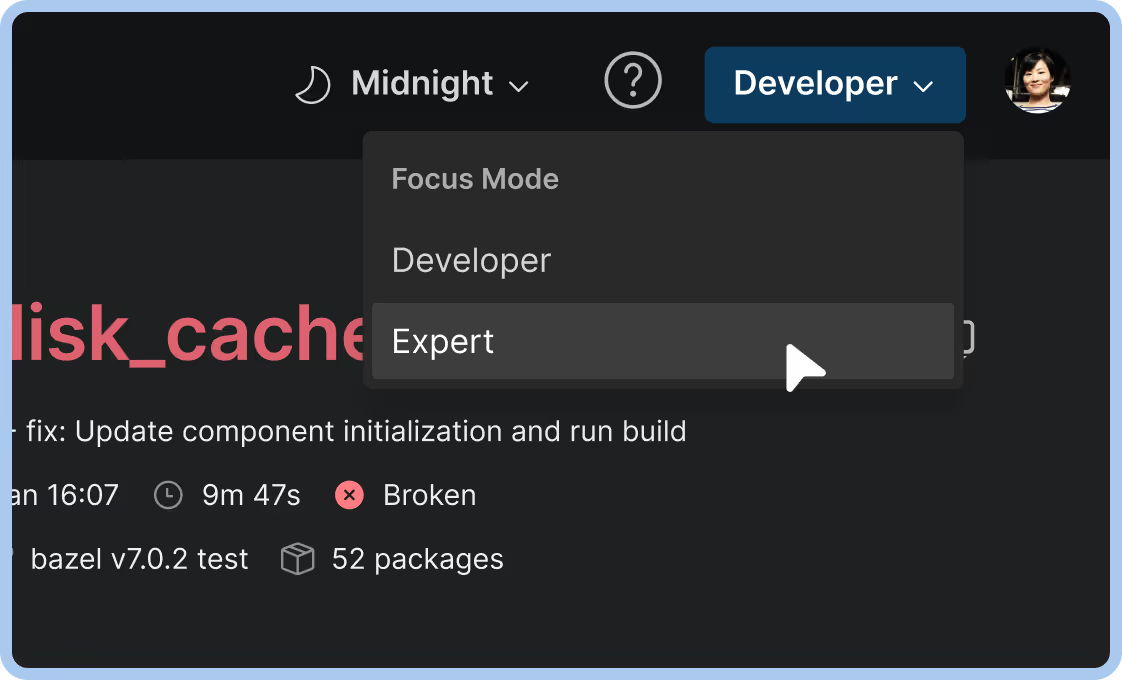
  <FeatureShowcase title="Choose your level of detail." flipped description="When you're trying to get a PR in, you need focus, not noise. Our UI shows only what's essential to your current task, hiding everything else by default. Toggle extra details when needed, keep them hidden when you don't.">
    <img noZoom src="https://mintcdn.com/aspectbuild/x1L7Iep716jCyJVo/images/marketing/web-ui/modes.avif?fit=max&auto=format&n=x1L7Iep716jCyJVo&q=85&s=9ba2d1c116487116e452ca9e8bdc02ab" alt="Web UI detail level modes" width="1122" height="680" data-path="images/marketing/web-ui/modes.avif" />
  </FeatureShowcase>

  <FeatureShowcase title="Marvin leads you to your CI results" description="Meet Marvin, our helpful robot mascot! He posts live-updating CI results directly to your PR with one-click access to our web UI. Marvin makes fixing PRs direct and fun.">
    <img noZoom src="https://mintcdn.com/aspectbuild/x1L7Iep716jCyJVo/images/marketing/web-ui/marvin.avif?fit=max&auto=format&n=x1L7Iep716jCyJVo&q=85&s=910f97f0166548b5739033abe0bffd1e" alt="Marvin CI results in PR" width="500" height="286" data-path="images/marketing/web-ui/marvin.avif" />
  </FeatureShowcase>
</Section>

<Section gray>
  <div className="flex flex-col md:flex-row items-start gap-12">
    <div className="flex-1">
      <h2 className="text-2xl font-semibold text-zinc-900 dark:text-white">The Details tab</h2>
      <p className="mt-4 text-zinc-600 dark:text-zinc-300">Every invocation carries a Details tab with the full story of the build:</p>

      <div className="mt-6 space-y-4">
        <div className="flex items-start gap-3">
          <span className="flex-shrink-0 w-5 h-5 rounded-full bg-green-100 dark:bg-green-900/30 flex items-center justify-center text-green-600 text-xs font-bold">✓</span>
          <p className="text-zinc-600 dark:text-zinc-300"><strong>Build profile:</strong> Download the full, concurrent timeline of the build, showing the true critical path, idle gaps, and scheduling delays. Open it in Perfetto or chrome://tracing to see exactly where wall-clock time went.</p>
        </div>

        <div className="flex items-start gap-3">
          <span className="flex-shrink-0 w-5 h-5 rounded-full bg-green-100 dark:bg-green-900/30 flex items-center justify-center text-green-600 text-xs font-bold">✓</span>
          <p className="text-zinc-600 dark:text-zinc-300"><strong>Target outcomes:</strong> Tests passed and cached, targets built and skipped, at a glance.</p>
        </div>

        <div className="flex items-start gap-3">
          <span className="flex-shrink-0 w-5 h-5 rounded-full bg-green-100 dark:bg-green-900/30 flex items-center justify-center text-green-600 text-xs font-bold">✓</span>
          <p className="text-zinc-600 dark:text-zinc-300"><strong>Invocation details:</strong> Status and exit code, start, end, and elapsed time, Bazel version, command and pattern, workspace, and counts of targets configured, packages loaded, and actions executed.</p>
        </div>

        <div className="flex items-start gap-3">
          <span className="flex-shrink-0 w-5 h-5 rounded-full bg-green-100 dark:bg-green-900/30 flex items-center justify-center text-green-600 text-xs font-bold">✓</span>
          <p className="text-zinc-600 dark:text-zinc-300"><strong>Target configuration:</strong> Identifiers and Make variables for the targets in the invocation.</p>
        </div>
      </div>
    </div>
  </div>
</Section>

<Section gray>
  <SectionHeader title="Enterprise-ready access control" subtitle="The Build & Test UI runs on your own DNS, behind your identity provider with SSO over OIDC or SAML. SCIM keeps user provisioning and deprovisioning in sync with your directory, so access is governed the same way as the rest of your engineering tooling." />
</Section>

<CTA title="Triage your next red build in seconds" subtitle="The Build & Test UI ships with every Aspect Workflows deployment." primaryCta="Start a Free Trial" primaryHref="/trial" secondaryCta="Request a Demo" secondaryHref="/request-demo" />