> ## Documentation Index
> Fetch the complete documentation index at: https://aspect.build/llms.txt
> Use this file to discover all available pages before exploring further.
# Remote execution on Aspect Enterprise
> The remote execution fleet in an Aspect Enterprise deployment: worker pools with their own images, instance types and platforms, including GPU and macOS; how pools scale; and what you configure.
Remote execution on Aspect Enterprise runs as a scheduler and pools of workers in the deployment's VPC, next to its [remote cache](/docs/aspect-workflows/enterprise/remote-cache). It implements the [Remote Execution API v2](https://github.com/bazelbuild/remote-apis), so Bazel, Buck2, Pants and Reclient all use it. [Remote execution](/docs/aspect-workflows/platform/features/remote-execution) explains what remote execution is and how a repository turns it on.
 ## How an action reaches a worker
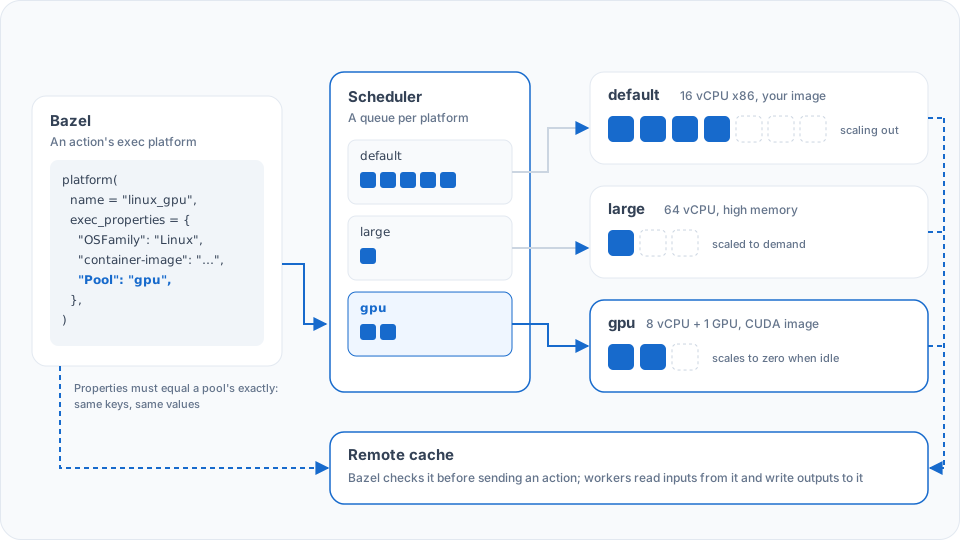
1. Bazel checks the remote cache for the action. On a hit, nothing runs.
2. On a miss, Bazel uploads any inputs the cache lacks and sends the action with its `exec_properties`: its exec platform's, merged with any the target sets.
3. The scheduler queues it for the pool whose platform properties equal that set exactly: same keys, same values.
4. A worker in that pool fetches the inputs from the cache, runs the action in the pool's container image, and writes the outputs back to the cache.
Because routing is by platform, one build mixes pools freely: compiles on the default pool, a memory-hungry link on a large pool, GPU tests on a GPU pool. [Targeting remote execution worker pools](/docs/aspect-workflows/platform/guides/remote-execution-worker-pools) covers the Bazel side.
## Worker pools
A deployment has as many pools as your build needs. You configure each one:
| Option | What it sets |
| - | - |
| **Container image** | The toolchain and system libraries actions see. Any image you build, such as a CUDA image for a GPU pool |
| **Platform properties** | What the pool advertises, such as `OSFamily` and `Pool`. Your Bazel exec platform requests the same set |
| **Instance type** | vCPU, memory, local NVMe, architecture (x86 or Arm) and GPUs, from any instance type your cloud offers |
| **Concurrency** | How many actions a worker runs at once |
| **vCPUs and memory per action slot** | Each slot's vCPUs, either isolated (dedicated to one action) or shared (several actions share the worker's vCPUs), and a memory ceiling per action. See [estimating capacity](/docs/aspect-workflows/enterprise/capacity#remote-execution) |
| **Operating system** | Linux; [macOS](/docs/aspect-workflows/enterprise/guides/macos-remote-execution) on EC2 Mac or Macs you provide |
| **Your own hardware** | Machines you run yourself join the fleet as workers, for any worker type |
Actions can run Docker, so container-based integration tests run remotely too.
## Scaling
Each pool scales on the depth of its own queue, between a floor and a ceiling you set. A floor of zero lets an idle pool scale to zero, and there's no platform limit on the ceiling.
## Making a configuration change
You decide the pools; who applies the change depends on how the deployment is run:
| Deployment | How a change lands |
| - | - |
| **Hosted by Aspect** | You [request it](/docs/aspect-workflows/enterprise/hosted/requesting-changes) and Aspect applies it |
| **Self-hosted, Aspect-managed or co-maintained** | You agree it with Aspect, and Aspect applies it to the deployment's configuration |
| **Self-hosted, customer-managed** | Your team changes the deployment's configuration, with Aspect's help |
Your repository changes alongside it: a new pool needs an exec platform in Bazel that requests its properties, and a toolchain that runs on its image.
## Trying it on your build
A [30-day trial of Aspect Enterprise](/docs/aspect-workflows/enterprise/trial) runs your build on the fleet and measures it against your current CI, on the same commits. To get more actions in flight, see [Parallelize remote execution](/docs/aspect-workflows/platform/guides/parallelization).
## Benchmark
The [AOSP build benchmark](/docs/aspect-workflows/platform/benchmarks/aosp-remote-execution) runs a full Android Open Source Project build on a self-hosted Aspect Enterprise deployment, with the fleet configuration and the public CI runs.
{user.loggedIn && user.tenantMetadata?.docsGroups?.includes('workflows-subscriber') ? (
On a self-hosted deployment, see:
) : null}
This documentation is built and hosted on [Mintlify](https://mintlify.com), a developer documentation platform.
## How an action reaches a worker
1. Bazel checks the remote cache for the action. On a hit, nothing runs.
2. On a miss, Bazel uploads any inputs the cache lacks and sends the action with its `exec_properties`: its exec platform's, merged with any the target sets.
3. The scheduler queues it for the pool whose platform properties equal that set exactly: same keys, same values.
4. A worker in that pool fetches the inputs from the cache, runs the action in the pool's container image, and writes the outputs back to the cache.
Because routing is by platform, one build mixes pools freely: compiles on the default pool, a memory-hungry link on a large pool, GPU tests on a GPU pool. [Targeting remote execution worker pools](/docs/aspect-workflows/platform/guides/remote-execution-worker-pools) covers the Bazel side.
## Worker pools
A deployment has as many pools as your build needs. You configure each one:
| Option | What it sets |
| - | - |
| **Container image** | The toolchain and system libraries actions see. Any image you build, such as a CUDA image for a GPU pool |
| **Platform properties** | What the pool advertises, such as `OSFamily` and `Pool`. Your Bazel exec platform requests the same set |
| **Instance type** | vCPU, memory, local NVMe, architecture (x86 or Arm) and GPUs, from any instance type your cloud offers |
| **Concurrency** | How many actions a worker runs at once |
| **vCPUs and memory per action slot** | Each slot's vCPUs, either isolated (dedicated to one action) or shared (several actions share the worker's vCPUs), and a memory ceiling per action. See [estimating capacity](/docs/aspect-workflows/enterprise/capacity#remote-execution) |
| **Operating system** | Linux; [macOS](/docs/aspect-workflows/enterprise/guides/macos-remote-execution) on EC2 Mac or Macs you provide |
| **Your own hardware** | Machines you run yourself join the fleet as workers, for any worker type |
Actions can run Docker, so container-based integration tests run remotely too.
## Scaling
Each pool scales on the depth of its own queue, between a floor and a ceiling you set. A floor of zero lets an idle pool scale to zero, and there's no platform limit on the ceiling.
## Making a configuration change
You decide the pools; who applies the change depends on how the deployment is run:
| Deployment | How a change lands |
| - | - |
| **Hosted by Aspect** | You [request it](/docs/aspect-workflows/enterprise/hosted/requesting-changes) and Aspect applies it |
| **Self-hosted, Aspect-managed or co-maintained** | You agree it with Aspect, and Aspect applies it to the deployment's configuration |
| **Self-hosted, customer-managed** | Your team changes the deployment's configuration, with Aspect's help |
Your repository changes alongside it: a new pool needs an exec platform in Bazel that requests its properties, and a toolchain that runs on its image.
## Trying it on your build
A [30-day trial of Aspect Enterprise](/docs/aspect-workflows/enterprise/trial) runs your build on the fleet and measures it against your current CI, on the same commits. To get more actions in flight, see [Parallelize remote execution](/docs/aspect-workflows/platform/guides/parallelization).
## Benchmark
The [AOSP build benchmark](/docs/aspect-workflows/platform/benchmarks/aosp-remote-execution) runs a full Android Open Source Project build on a self-hosted Aspect Enterprise deployment, with the fleet configuration and the public CI runs.
{user.loggedIn && user.tenantMetadata?.docsGroups?.includes('workflows-subscriber') ? (
On a self-hosted deployment, see:
) : null}
This documentation is built and hosted on [Mintlify](https://mintlify.com), a developer documentation platform.