> ## Documentation Index
> Fetch the complete documentation index at: https://aspect.build/llms.txt
> Use this file to discover all available pages before exploring further.
# Remote cache on Aspect Enterprise
> The remote cache in an Aspect Enterprise deployment: an autoscaling cache tier on object storage, on the private network beside CI runners and remote execution, with an external endpoint for developers and CI outside the deployment.
export const gatedHref = (user, href, group) => {
const loggedIn = !!(user && user.loggedIn);
const groups = user && user.tenantMetadata && user.tenantMetadata.docsGroups || [];
if (loggedIn && (!group || groups.indexOf(group) >= 0)) {
return href;
}
return loggedIn ? undefined : "/login?redirect=" + encodeURIComponent(href);
};
export const gatedAccess = (user, group) => {
const loggedIn = !!(user && user.loggedIn);
const groups = user && user.tenantMetadata && user.tenantMetadata.docsGroups || [];
if (loggedIn && (!group || groups.indexOf(group) >= 0)) {
return "entitled";
}
return loggedIn ? "signed-in" : "anonymous";
};
export const GatedLink = ({access, href, group, children}) => {
const note = group ? "Aspect Enterprise customers" : "free Aspect account";
const muted = {
fontSize: "0.85em",
opacity: 0.7,
whiteSpace: "nowrap"
};
if (access === "entitled") {
return {children};
}
if (access !== "signed-in") {
return
{children}
(sign in: {note})
;
}
return
{children}
({note})
;
};
Every Aspect Enterprise deployment has its own remote cache, on the deployment's private network beside its CI runners and [remote execution](/docs/aspect-workflows/enterprise/remote-execution) workers. [Remote cache](/docs/aspect-workflows/platform/features/remote-cache) explains what a remote cache does and the Bazel flags that use it.
## Storage
A cache tier serves the cache from object storage in the deployment's account: S3 Express on AWS, Cloud Storage on GCP.
* **Capacity follows the bucket.** There are no disks to size or shards to rebalance; you size the tier's throughput, as a fixed size or scaling between bounds you set.
* **Retention is yours to set.** Longer retention raises the hit rate on rarely-touched targets and stores more bytes.
* **Data stays in the account.** Self-hosted, the bucket is in your AWS account or GCP project, under your policies.
## Data transfer
CI runners and remote execution workers reach the cache on the deployment's private network, so the traffic between them, the bulk of a build's bytes, never crosses the internet and keeps cloud data transfer charges to a minimum. That's why we recommend running CI on the deployment's own runners.
## The external endpoint
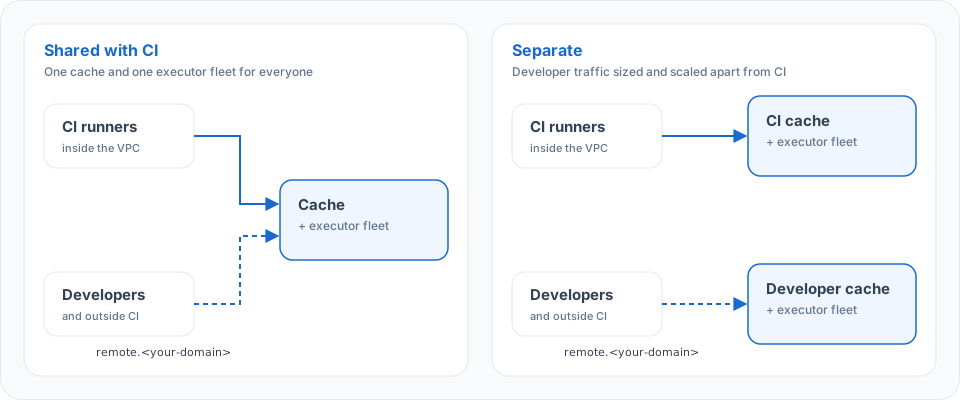
Developer machines, and CI you run outside the deployment, reach the cache and remote execution through the external endpoint, `remote.`, over the internet. Clients sign in through the deployment's identity provider with `aspect auth`, which also serves Bazel's credential helper. The endpoint runs in one of two modes:
 | Mode | What it means |
| - | - |
| **Shared with CI** | Developers read CI's results, so a laptop build reuses what CI built for the same inputs and platform |
| **Separate** | Developer traffic gets its own cache and executor fleet, sized and scaled apart from CI's |
In the shared mode, developers set `--noremote_upload_local_results` so their machines don't upload results of actions they run locally; results of remotely executed actions are written by the workers. See [who writes to the cache](/docs/aspect-workflows/platform/features/remote-cache#who-writes-to-the-cache).
Networks that can't reach the internet use a private endpoint (AWS PrivateLink or GCP Private Service Connect) or, self-hosted, VPC peering or your VPN. See [network topology](/docs/aspect-workflows/enterprise/self-hosted#network-topology).
{user.loggedIn && user.tenantMetadata?.docsGroups?.includes('workflows-subscriber') ? (
On a self-hosted deployment, see:
) : null}
This documentation is built and hosted on [Mintlify](https://mintlify.com), a developer documentation platform.
| Mode | What it means |
| - | - |
| **Shared with CI** | Developers read CI's results, so a laptop build reuses what CI built for the same inputs and platform |
| **Separate** | Developer traffic gets its own cache and executor fleet, sized and scaled apart from CI's |
In the shared mode, developers set `--noremote_upload_local_results` so their machines don't upload results of actions they run locally; results of remotely executed actions are written by the workers. See [who writes to the cache](/docs/aspect-workflows/platform/features/remote-cache#who-writes-to-the-cache).
Networks that can't reach the internet use a private endpoint (AWS PrivateLink or GCP Private Service Connect) or, self-hosted, VPC peering or your VPN. See [network topology](/docs/aspect-workflows/enterprise/self-hosted#network-topology).
{user.loggedIn && user.tenantMetadata?.docsGroups?.includes('workflows-subscriber') ? (
On a self-hosted deployment, see:
) : null}
This documentation is built and hosted on [Mintlify](https://mintlify.com), a developer documentation platform.