> ## Documentation Index
> Fetch the complete documentation index at: https://aspect.build/llms.txt
> Use this file to discover all available pages before exploring further.
# CI runners on Aspect Enterprise
> Aspect Workflows CI runners on Aspect Enterprise: persistent, auto-scaling runners for GitHub Actions, Buildkite, GitLab and CircleCI that keep Bazel warm between jobs and sit next to the deployment's remote cache and remote execution.
export const gatedHref = (user, href, group) => {
const loggedIn = !!(user && user.loggedIn);
const groups = user && user.tenantMetadata && user.tenantMetadata.docsGroups || [];
if (loggedIn && (!group || groups.indexOf(group) >= 0)) {
return href;
}
return loggedIn ? undefined : "/login?redirect=" + encodeURIComponent(href);
};
export const gatedAccess = (user, group) => {
const loggedIn = !!(user && user.loggedIn);
const groups = user && user.tenantMetadata && user.tenantMetadata.docsGroups || [];
if (loggedIn && (!group || groups.indexOf(group) >= 0)) {
return "entitled";
}
return loggedIn ? "signed-in" : "anonymous";
};
export const GatedLink = ({access, href, group, children}) => {
const note = group ? "Aspect Enterprise customers" : "free Aspect account";
const muted = {
fontSize: "0.85em",
opacity: 0.7,
whiteSpace: "nowrap"
};
if (access === "entitled") {
return {children};
}
if (access !== "signed-in") {
return
{children}
(sign in: {note})
;
}
return
{children}
({note})
;
};
Most CI runners start every job from an empty disk, so Bazel starts cold every time. Aspect Workflows CI runners keep Bazel warm across jobs and as they scale, and they sit next to your deployment's remote cache and remote execution. They register with GitHub Actions, Buildkite, GitLab or CircleCI as that provider's self-hosted runners, so your pipelines keep their own definitions and their `bazel` steps. They run as Linux VMs (x86, Arm or GPU) on any instance type your cloud offers, in your AWS account or GCP project, or in Aspect's when the deployment is hosted by Aspect. macOS and OCI image-based runners are coming soon.
To configure them, start at CI setup or the [table below](#configuring-them).
 ## What they add
| | |
| - | - |
| **Bazel warm at any scale** | Runners are persistent, so the output base carries over between jobs, and the Bazel server and analysis cache do too while a group's jobs keep the same startup options and build flags. A new runner restores a warming archive, so it starts with external repositories fetched |
| **Next to the cache and fleet** | Cache reads and remote execution never cross the internet, which keeps [data transfer](/docs/aspect-workflows/enterprise/remote-cache#data-transfer) charges to a minimum |
| **Your hardware and image** | Any instance type, including high-memory and GPU, booted from a VM image you customize. Docker-based tests run on them |
| **Scaling you set** | Each group scales on its queue between the minimum and maximum you set; a group with a minimum of zero uses no compute while idle |
| **Operated by Aspect** | Hosted by Aspect, or self-hosted and Aspect-managed: images, scaling and upgrades, as part of [what Aspect does](/docs/aspect-workflows/enterprise/overview#what-aspect-does) |
## How they work
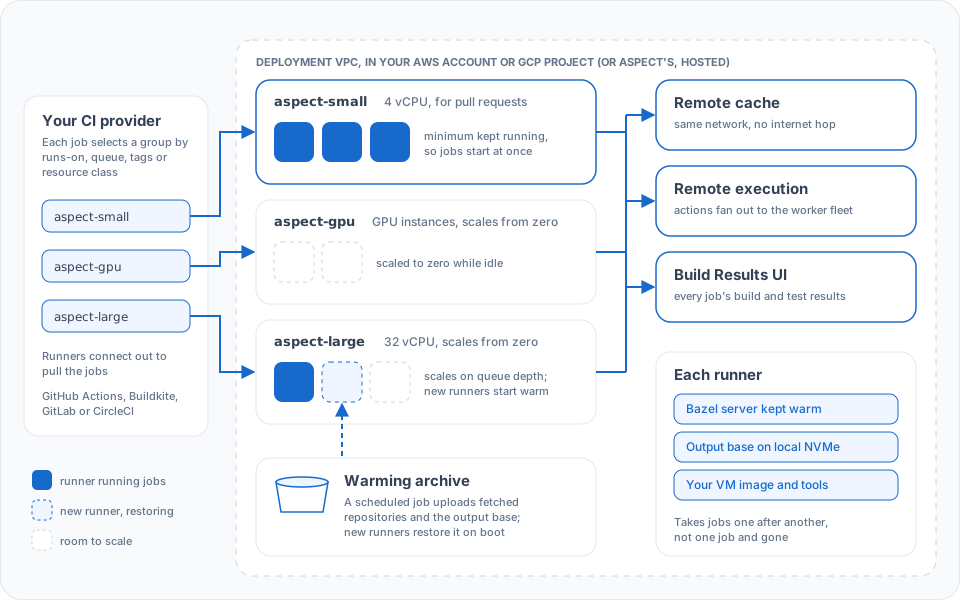
1. **A job picks a runner group** with your CI provider's own selector: `runs-on:` labels, a Buildkite queue, GitLab tags or a CircleCI resource class. Each group is a set of identical machines.
2. **A runner takes the job.** Runners are persistent: each takes jobs one after another, so the output base stays on local NVMe from one job to the next, and the Bazel server keeps its analysis cache in memory while consecutive jobs use the same flags.
3. **Bazel on the runner uses the deployment.** The cache and remote execution are on the same private network, and every build streams to the Build Results UI.
4. **Groups scale on queue depth.** A new runner restores the group's warming archive while it boots, so its first job starts with external repositories fetched and repository rules run; it still starts a Bazel server and runs analysis.
## Runner groups
A deployment usually has several groups, so each kind of job lands on the hardware it needs and the common case doesn't pay for the rare one:
* **Architecture:** an Arm group for Arm targets, x86 for the rest.
* **Memory:** one large-memory group for the link step or the test that needs 128 GiB.
* **GPUs:** for model training and inference tests.
* **Latency versus cost:** a small group kept warm for pull requests, larger groups that scale from zero for scheduled work.
For each group you configure:
| Option | What it controls | Lines up with |
| - | - | - |
| **Name** | The queue or label your CI jobs target | Your pipeline's selector. See runner groups |
| **Instance type** | vCPU, memory, architecture, GPUs, local NVMe | Your build's memory ceiling, and any test that needs a GPU or Arm |
| **Minimum size** | Machines kept running when the queue is empty | How fast the first job of the morning starts |
| **Maximum size** | The ceiling the group scales to | Peak concurrency of your pipeline. See [estimating capacity](/docs/aspect-workflows/enterprise/capacity) |
| **Idle runners** | Free runners kept ready beyond those running jobs | How many jobs arrive at once |
| **Warming set** | Which warming archive the group restores | Your scheduled warming job. See warming |
| **Disk size** | NVMe available to the Bazel output base | Repository size plus output base growth between reclaims |
A runner group is where a *CI job* runs. A [remote execution worker pool](/docs/aspect-workflows/enterprise/remote-execution#worker-pools) is where individual *Bazel actions* run once the job fans out. With remote execution, the runner still runs Bazel's analysis, sends the actions that miss the cache, and downloads only the outputs it needs (Build without the Bytes), so it can be small.
## Configuring them
| To | See |
| - | - |
| Point a job at the deployment, with the setup step | CI setup |
| Send each job to the right group | Runner groups |
| Start from a complete pipeline | GitHub Actions, Buildkite, GitLab CI, CircleCI |
| Schedule the warming job | Warming |
| Register the runners with your CI provider | Hosted by Aspect: the [CI provider credential](/docs/aspect-workflows/enterprise/hosted/setup#1-a-ci-provider-credential-if-you-use-workflows-ci-runners) you provide. Self-hosted: runner registration |
| Change a group's size or scaling | Hosted by Aspect: [request it](/docs/aspect-workflows/enterprise/hosted/requesting-changes). Self-hosted: the runner group settings in the AWS or GCP Terraform reference. Then tune with [Optimizing CI runners](/docs/aspect-workflows/enterprise/guides/optimizing-ci-runners) |
| Use runners you already operate, on any CI system | CI setup on runners you manage |
This documentation is built and hosted on [Mintlify](https://mintlify.com), a developer documentation platform.
## What they add
| | |
| - | - |
| **Bazel warm at any scale** | Runners are persistent, so the output base carries over between jobs, and the Bazel server and analysis cache do too while a group's jobs keep the same startup options and build flags. A new runner restores a warming archive, so it starts with external repositories fetched |
| **Next to the cache and fleet** | Cache reads and remote execution never cross the internet, which keeps [data transfer](/docs/aspect-workflows/enterprise/remote-cache#data-transfer) charges to a minimum |
| **Your hardware and image** | Any instance type, including high-memory and GPU, booted from a VM image you customize. Docker-based tests run on them |
| **Scaling you set** | Each group scales on its queue between the minimum and maximum you set; a group with a minimum of zero uses no compute while idle |
| **Operated by Aspect** | Hosted by Aspect, or self-hosted and Aspect-managed: images, scaling and upgrades, as part of [what Aspect does](/docs/aspect-workflows/enterprise/overview#what-aspect-does) |
## How they work
1. **A job picks a runner group** with your CI provider's own selector: `runs-on:` labels, a Buildkite queue, GitLab tags or a CircleCI resource class. Each group is a set of identical machines.
2. **A runner takes the job.** Runners are persistent: each takes jobs one after another, so the output base stays on local NVMe from one job to the next, and the Bazel server keeps its analysis cache in memory while consecutive jobs use the same flags.
3. **Bazel on the runner uses the deployment.** The cache and remote execution are on the same private network, and every build streams to the Build Results UI.
4. **Groups scale on queue depth.** A new runner restores the group's warming archive while it boots, so its first job starts with external repositories fetched and repository rules run; it still starts a Bazel server and runs analysis.
## Runner groups
A deployment usually has several groups, so each kind of job lands on the hardware it needs and the common case doesn't pay for the rare one:
* **Architecture:** an Arm group for Arm targets, x86 for the rest.
* **Memory:** one large-memory group for the link step or the test that needs 128 GiB.
* **GPUs:** for model training and inference tests.
* **Latency versus cost:** a small group kept warm for pull requests, larger groups that scale from zero for scheduled work.
For each group you configure:
| Option | What it controls | Lines up with |
| - | - | - |
| **Name** | The queue or label your CI jobs target | Your pipeline's selector. See runner groups |
| **Instance type** | vCPU, memory, architecture, GPUs, local NVMe | Your build's memory ceiling, and any test that needs a GPU or Arm |
| **Minimum size** | Machines kept running when the queue is empty | How fast the first job of the morning starts |
| **Maximum size** | The ceiling the group scales to | Peak concurrency of your pipeline. See [estimating capacity](/docs/aspect-workflows/enterprise/capacity) |
| **Idle runners** | Free runners kept ready beyond those running jobs | How many jobs arrive at once |
| **Warming set** | Which warming archive the group restores | Your scheduled warming job. See warming |
| **Disk size** | NVMe available to the Bazel output base | Repository size plus output base growth between reclaims |
A runner group is where a *CI job* runs. A [remote execution worker pool](/docs/aspect-workflows/enterprise/remote-execution#worker-pools) is where individual *Bazel actions* run once the job fans out. With remote execution, the runner still runs Bazel's analysis, sends the actions that miss the cache, and downloads only the outputs it needs (Build without the Bytes), so it can be small.
## Configuring them
| To | See |
| - | - |
| Point a job at the deployment, with the setup step | CI setup |
| Send each job to the right group | Runner groups |
| Start from a complete pipeline | GitHub Actions, Buildkite, GitLab CI, CircleCI |
| Schedule the warming job | Warming |
| Register the runners with your CI provider | Hosted by Aspect: the [CI provider credential](/docs/aspect-workflows/enterprise/hosted/setup#1-a-ci-provider-credential-if-you-use-workflows-ci-runners) you provide. Self-hosted: runner registration |
| Change a group's size or scaling | Hosted by Aspect: [request it](/docs/aspect-workflows/enterprise/hosted/requesting-changes). Self-hosted: the runner group settings in the AWS or GCP Terraform reference. Then tune with [Optimizing CI runners](/docs/aspect-workflows/enterprise/guides/optimizing-ci-runners) |
| Use runners you already operate, on any CI system | CI setup on runners you manage |
This documentation is built and hosted on [Mintlify](https://mintlify.com), a developer documentation platform.